


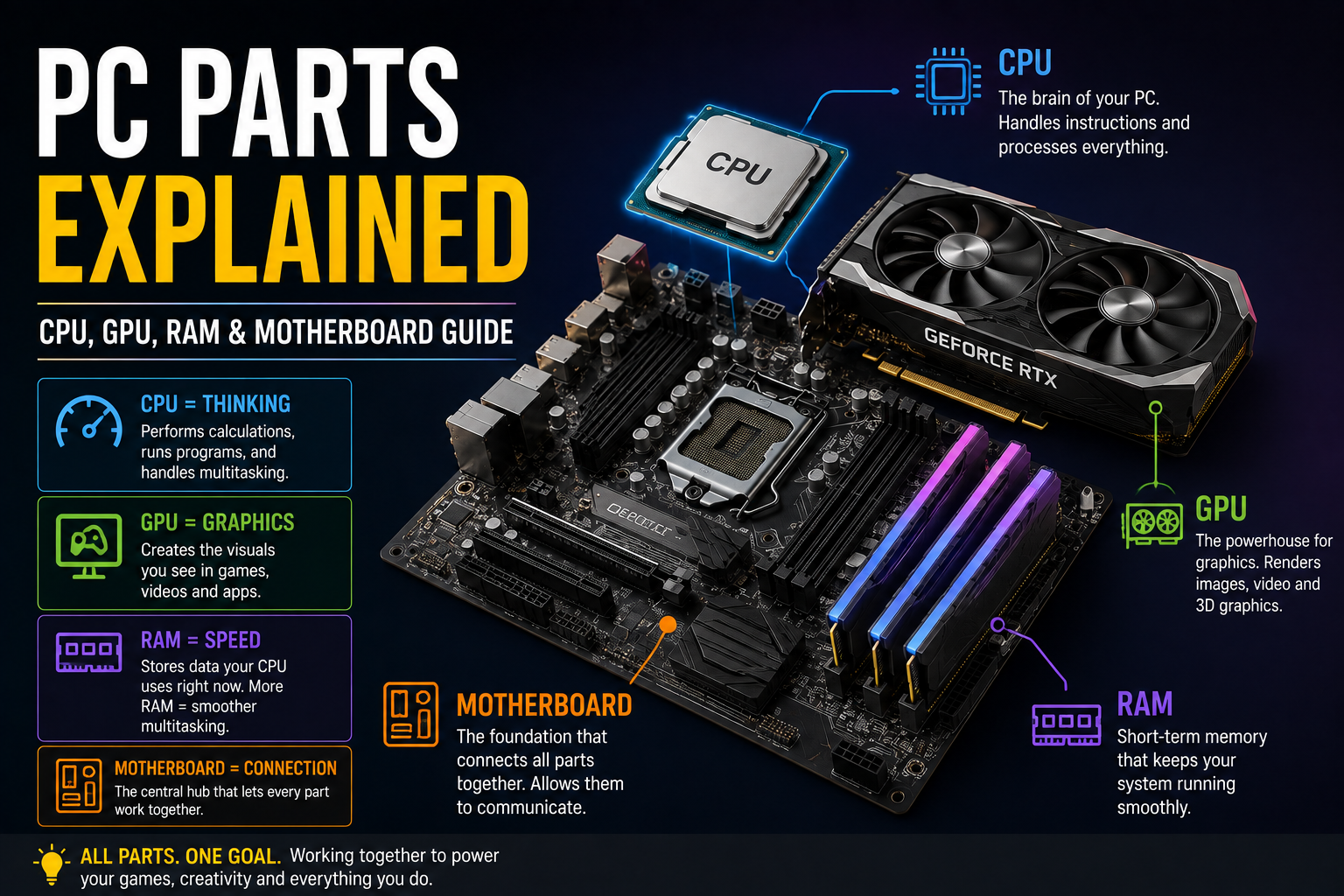
Quick answer: A gaming PC has five core components: the CPU (processes instructions), GPU (renders graphics), RAM (short-term memory for active tasks), motherboard (connects everything together), and storage (holds your files and OS long-term). Understanding what each one does — and which matters most for gaming — makes it much easier to choose the right parts for your build or budget.
If you’re new to PC building or just buying a computer, the alphabet soup of components can be confusing. Here’s what each part actually does, in plain language, plus what to look for when choosing one for gaming specifically.
CPU (Processor)
The CPU is your computer’s general-purpose brain — it handles game logic, AI behavior, physics calculations, and coordinates everything else in the system. For gaming specifically, the CPU matters most in CPU-intensive games (strategy games, simulations, titles with many NPCs) and for maintaining high frame rates in competitive games where every millisecond counts.
What to look for in a CPU for a gaming PC:
- Core count matters less for gaming than for productivity tasks — 6-8 cores is plenty for nearly all current games
- Single-core performance and clock speed matter more for gaming frame rates specifically
- AMD Ryzen and Intel Core processors are the two mainstream options; both offer strong gaming-focused chips at every price tier
GPU (Graphics Card)
The GPU renders everything you see on screen — textures, lighting, resolution, and frame rate all depend primarily on this one component. For gaming, the GPU has the single biggest impact on performance of any part in your build.
What to look for:
- VRAM (video memory) — 8GB is a reasonable minimum for 1080p, 12GB+ for 1440p, 16GB+ for 4K
- Match your GPU tier to your monitor’s resolution and refresh rate — an ultra-high-end GPU is wasted on a 1080p 60Hz monitor
RAM (Memory)
RAM is short-term, high-speed memory your system uses for whatever’s actively running — it’s cleared when you shut down, unlike storage. Insufficient RAM causes stuttering, slowdowns, and background apps getting forcibly closed as the system runs out of space to work with.
How much RAM do you need?
- 16GB is the current baseline for smooth gaming
- 32GB is worth it if you multitask heavily, stream, or run demanding creative software alongside games
- Beyond 32GB rarely improves gaming performance specifically — it mainly helps professional workloads
DDR5 vs. older RAM: DDR5 is the current-generation standard, offering higher speeds and better efficiency than DDR4. If you’re building a new system in 2026, DDR5 is the right choice — DDR4 only makes sense if you’re upgrading an older, compatible system rather than building fresh.
Motherboard
The motherboard is the central hub every other component connects to. It doesn’t directly affect gaming performance the way a GPU does, but it determines what CPU you can use (via socket type), how much RAM you can install, and how many drives and expansion cards you can add.
What to look for in a motherboard for gaming:
- Socket compatibility with your chosen CPU is non-negotiable — this is the single most important compatibility check in any build
- Sufficient RAM slots and speed support for your planned memory
- Enough M.2 slots for your storage plans, plus adequate PCIe slots for your GPU (and any future upgrades)
- Higher-end boards add better power delivery (useful for high-end CPUs), more USB ports, and Wi-Fi 6E/7 — nice-to-haves rather than gaming necessities
PC Case
The case houses everything and affects airflow, noise, and how easy the system is to build in and upgrade later. It has no direct impact on performance, but a poorly ventilated case can cause components to run hotter and throttle under load.
What to look for:
- Airflow-focused designs (mesh front panels) generally outperform closed, glass-heavy designs for cooling, even if the glass looks nicer
- Confirm it physically fits your motherboard size (ATX, Micro-ATX, Mini-ITX) and your GPU’s length before buying
How These Parts Work Together
None of these components perform in isolation — a high-end GPU paired with a weak CPU will bottleneck (the CPU can’t feed the GPU data fast enough to use its full potential), and insufficient RAM will cause stuttering even with top-tier CPU and GPU choices. Balance across components matters more than maxing out any single one.
Frequently Asked Questions
What is the most important PC part for gaming? The GPU has the single biggest impact on gaming performance, since it directly renders resolution, frame rate, and visual settings. The CPU matters more in specific CPU-intensive games and for maintaining high frame rates in competitive titles.
How much RAM do I need for gaming? 16GB is the current baseline for smooth gaming performance. 32GB is worth considering if you multitask heavily, stream while gaming, or run demanding software alongside your games.
What’s the difference between a CPU and a GPU? The CPU handles general processing tasks like game logic and physics calculations, while the GPU specifically renders graphics — the visuals you see on screen. Both matter for gaming, but the GPU has a larger direct impact on frame rate and visual quality.
Is DDR5 RAM worth it over DDR4? Yes, for a new build in 2026 — DDR5 offers higher speeds and better efficiency than DDR4, and is the current standard supported by all current-generation motherboards and CPUs.
What should I look for in a motherboard for gaming? CPU socket compatibility is the most critical factor, followed by sufficient RAM slots, adequate M.2 storage slots, and enough PCIe slots for your GPU and any future expansion.
Ready to put these parts together into a full build? See our complete step-by-step gaming PC build guide, or check PCPartPicker to confirm compatibility across your chosen parts before buying.
