


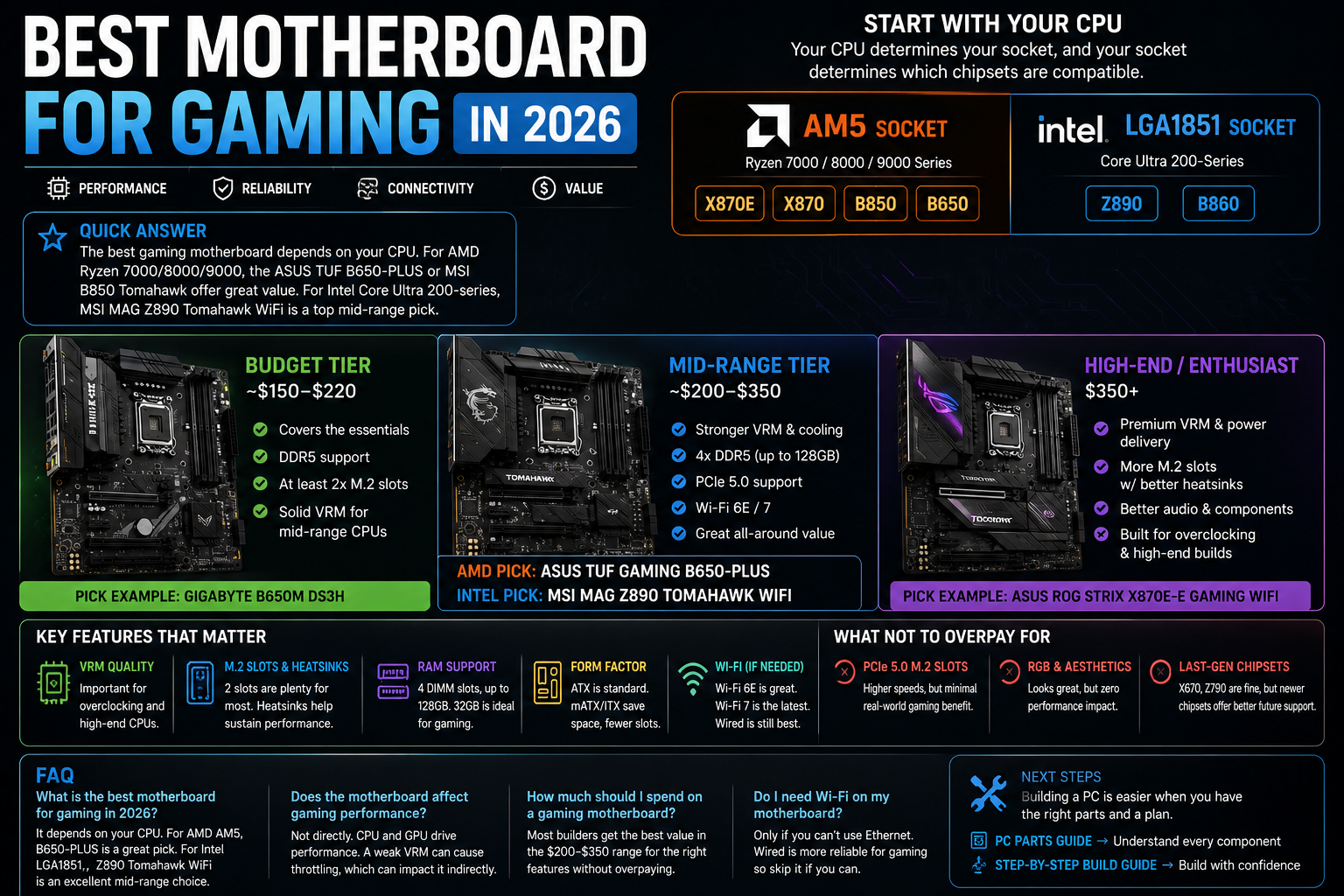
Quick answer: The best gaming motherboard depends entirely on your CPU choice, since the socket and chipset must match. For AMD Ryzen 7000/8000/9000 builds, a mid-range AM5 board like the ASUS TUF Gaming B650-PLUS or MSI MAG B850 Tomahawk offers strong value. For Intel Core Ultra 200-series builds, a Z890 or B860 board is the equivalent choice, with the MSI MAG Z890 Tomahawk WiFi a solid mid-range pick.
Choosing a motherboard trips up a lot of first-time builders, mostly because the “best” board is really a function of what CPU you’ve already chosen, not a standalone pick. Here’s how to narrow it down correctly.
Start With Your CPU, Not the Motherboard
Your CPU determines your socket, and your socket determines which chipsets are compatible:
- AMD Ryzen 7000/8000/9000 series → AM5 socket → X870E, X870, B850, or B650 chipsets
- Intel Core Ultra 200-series → LGA1851 socket → Z890 or B860 chipsets
Once you know your socket and chipset tier, you’re choosing between boards within that category based on features — not comparing AMD and Intel boards head-to-head, since they’re never interchangeable.
Budget Tier (~$150-$220)
At this tier, look for a board that covers the essentials without extras you won’t use: DDR5 support, at least two M.2 slots, and a VRM (power delivery) solid enough for a mid-range CPU. Skip integrated Wi-Fi at this price if you’re on a wired connection anyway — it’s an easy way to shave cost without losing anything you’d actually use.
What to check: Confirm the board explicitly supports your specific CPU model in its QVL (Qualified Vendor List) or compatibility chart — not just “supports AM5” broadly, since some budget boards need a BIOS update for newer CPU generations that isn’t always pre-loaded out of the box.
Mid-Range Tier (~$200-$350)
This is where most gaming builders should land. Boards like the ASUS TUF Gaming B650-PLUS (AM5) or MSI MAG Z890 Tomahawk WiFi (LGA1851) offer a strong balance: solid VRM cooling, 4x DDR5 slots supporting up to 128GB of RAM, PCIe 5.0 support, and built-in Wi-Fi 6E or 7. These boards are durable enough to comfortably run a mid-to-high-end CPU without a bottleneck on the motherboard side.
High-End / Enthusiast Tier ($350+)
Boards at this tier — like the ASUS ROG Strix X870E-E Gaming WiFi or Gigabyte’s AORUS Ultra series — add stronger VRM phases for overclocking, more M.2 slots with better heatsinks, higher-end audio components, and premium connectivity. Worth it if you’re pairing with a flagship CPU and GPU, or plan to overclock; overkill if you’re not pushing your CPU beyond stock settings.
Key Features to Actually Care About
- VRM quality — matters most if you’re overclocking or running a high-end CPU at stock boost clocks for extended periods; budget CPUs paired with budget boards are usually fine without a premium VRM
- M.2 slot count and heatsinks — one slot covers a single NVMe drive; two is plenty for most gaming builders; heatsinks help sustain performance during long game installs or heavy read/write sessions
- RAM capacity and speed support — most gaming boards support up to 128GB across 4 DIMM slots, though 32GB is enough for gaming specifically
- Form factor — ATX is the standard choice for most builds; Micro-ATX and Mini-ITX trade expansion slots for a smaller case footprint, useful for compact builds
- Wi-Fi standard, if you need wireless — Wi-Fi 6E is solid and current; Wi-Fi 7 adds extra throughput and reduces congestion but isn’t essential for gaming specifically. Wired Ethernet is still the more reliable choice for gaming when it’s an option.
What Not to Overpay For
- PCIe 5.0 M.2 slots — affects sequential read speeds, not real-world game load times in most current titles; not worth a price premium unless you have a specific workstation use case
- RGB lighting and premium aesthetics — purely cosmetic, no performance impact
- Last-generation chipsets (X670, Z790) — generally worth skipping for a new build in favor of current-gen chipsets, since you’ll get better future CPU upgrade compatibility on the newer platform
Frequently Asked Questions
What is the best motherboard for gaming in 2026? There’s no single best board — it depends on your CPU. For AMD AM5 builds, a mid-range board like the ASUS TUF Gaming B650-PLUS offers strong value; for Intel LGA1851 builds, the MSI MAG Z890 Tomahawk WiFi is a comparable pick.
Does the motherboard affect gaming performance? Not directly — the CPU and GPU drive gaming performance, not the motherboard itself. However, a motherboard with weak VRM cooling can cause a high-end CPU to throttle under sustained load, indirectly affecting performance.
How much should I spend on a gaming motherboard? Most gaming builders get the best value in the $200-$350 range, which covers solid VRM cooling, DDR5 support, PCIe 5.0, and modern connectivity without paying for enthusiast-tier extras most people won’t use.
Do I need Wi-Fi on my gaming motherboard? Only if you don’t have access to a wired Ethernet connection. Wired connections are generally more reliable for gaming, so it’s reasonable to skip a Wi-Fi-equipped board and save the cost if you can run a cable to your setup.
Choosing a motherboard is just one part of a full build — see our complete PC parts guide covering CPU, GPU, RAM, and more, or jump to our step-by-step build guide once your parts list is set.
