


In the digital age, data reigns supreme. From irreplaceable family photos to mission-critical business documents, the value of digital files is undeniable. Yet, data loss isn’t a question of if but when. Whether due to accidental deletions, hardware failures, or malware attacks, losing files can disrupt lives and workflows. This is where data recovery software steps in—but with countless tools flooding the market, how do you choose the right one?
RecoveryFox AI, a newcomer developed by WonderFox Soft and released on April 1, 2025. Promising AI-powered precision and broad compatibility, it claims to recover lost files across PCs, laptops, and external drives effortlessly. But does it live up to the hype? In this unbiased review, we dissect its features, test its performance, and reveal whether it’s worth your time and trust.
What Is RecoveryFox AI?
RecoveryFox AI is a data recovery solution designed for Windows 10 and 11 users. Developed by WonderFox Soft—a company known for multimedia tools like HD Video Converter Factory—this software targets both casual and professional users struggling with data loss. Unlike traditional recovery tools, RecoveryFox AI integrates machine learning to identify fragmented files and reconstruct damaged file structures.

Features and Capabilities
RecoveryFox AI distinguishes itself with a blend of intuitive design and powerful functionality. Here’s what it offers:
- Clean, Beginner-Friendly Interface
The dashboard avoids technical jargon, guiding users through a three-step process: Select a Location → Scan → Recover. Large buttons and tooltips ensure even novices can navigate confidently.
- 500+ File Type Support
It has the ability to recover lost documents (PDF, DOCX), photos (JPEG, RAW), videos (MP4, MOV), audio files, archives (ZIP, RAR), and more.
- Broad Storage Compatibility
RecoveryFox AI works well with NTFS, FAT32 and exFAT file systems across:
– Internal drives (HDD/SSD)
– External storage (USB 3.2/Type-C drives)
– Memory cards (SD, microSD)
- Dual Scanning Modes
Quick Scan: Finds recently deleted files in seconds.
AI Scan: Uses machine learning to locate files from formatted or corrupted drives.
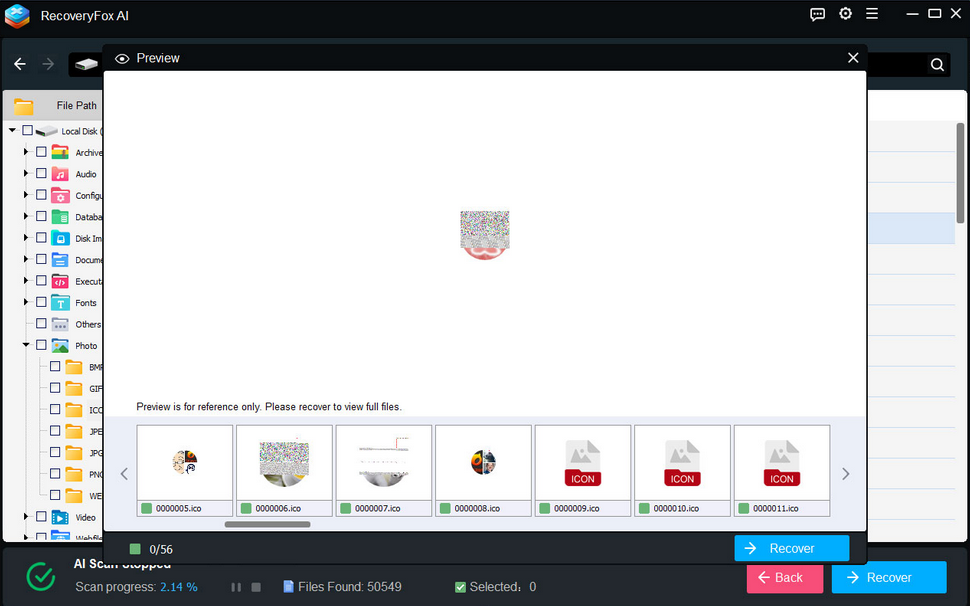
- Preview Before Recovery
It provides a free preview window for you to preview images, documents, and videos to verify file integrity, avoiding wasted time on corrupted recoveries.
- Smart Filters and Search
Sort results by file type, date, or size. Use keywords to pinpoint specific files instantly.
RecoveryFox AI Use Cases (Scenario Table)
| Scenario | How RecoveryFox AI Helps |
| Accidental Deletion | Restores files deleted via Shift+Delete or emptied from the Recycle Bin. |
| Partition Loss | Retrieves files from deleted or corrupted partitions. |
| Formatted Drives | Recovers data even after quick/full formatting (via AI Scan). |
| Virus Attacks | Recovers files encrypted or hidden by malware. |
| External Drive Errors | Recovers data from unreadable USB/SD cards. |
| Logical Disk Crash | Connect the crashed hard disk to a working computer as an external drive and then run an AI Scan using RecoveryFox AI to restore your lost data. |
Step-by-Step Guide to Using RecoveryFox AI
In this section, we will guide you on how to use it to retrieve lost data step by step.
Step 1: Install and Launch the Software.
Download RecoveryFox AI from the official website. Install it on a healthy drive (not the one with lost data) to prevent original data overwriting.
If you are prompted with the “Permission denied, administrator privileges required!” (as shown below), remember to right-click on its icon and select “Run as administrator”.

Step 2: Select the Target Drive.
Launch the software and choose the affected drive from the divre list. For external devices, you’d better to ensure they’re connected and detected.
Step 3: Waiting for the Scanning Process to Complete.
Quick Scan: Ideal for accidental deletions or recycle bin empties.
AI Deep Scan: Required for formatted drives or partition losses.
You can manually pause or stop the scanning process at any time if you find that the target file has been found.
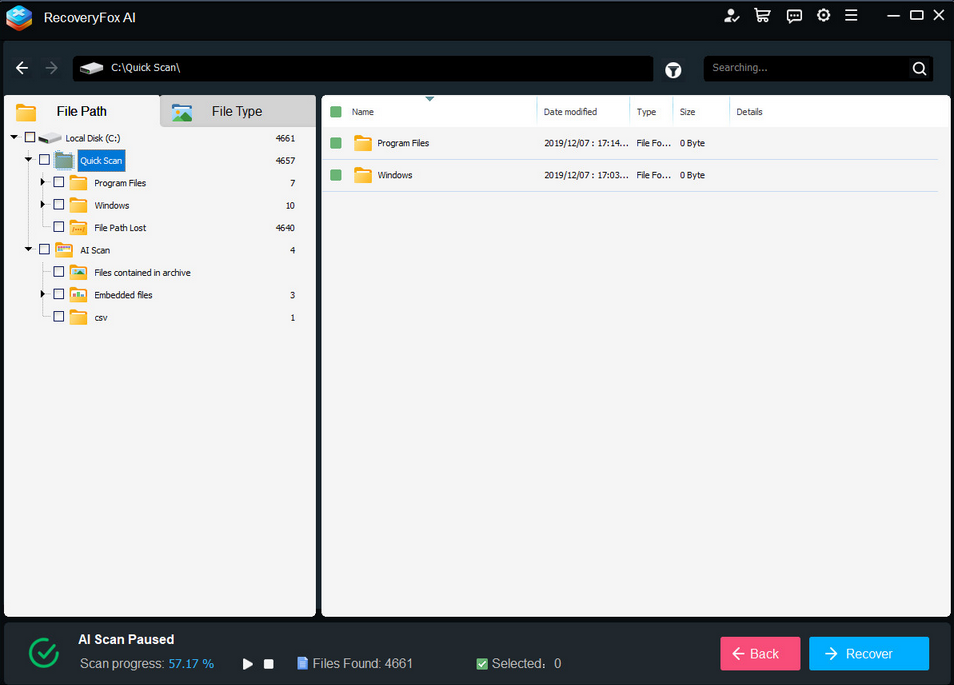
Step 4: Preview and Select Files.
View results as soon as scanning is complete (time varies by drive size). And use the “Preview” button to check the integrity of the file.
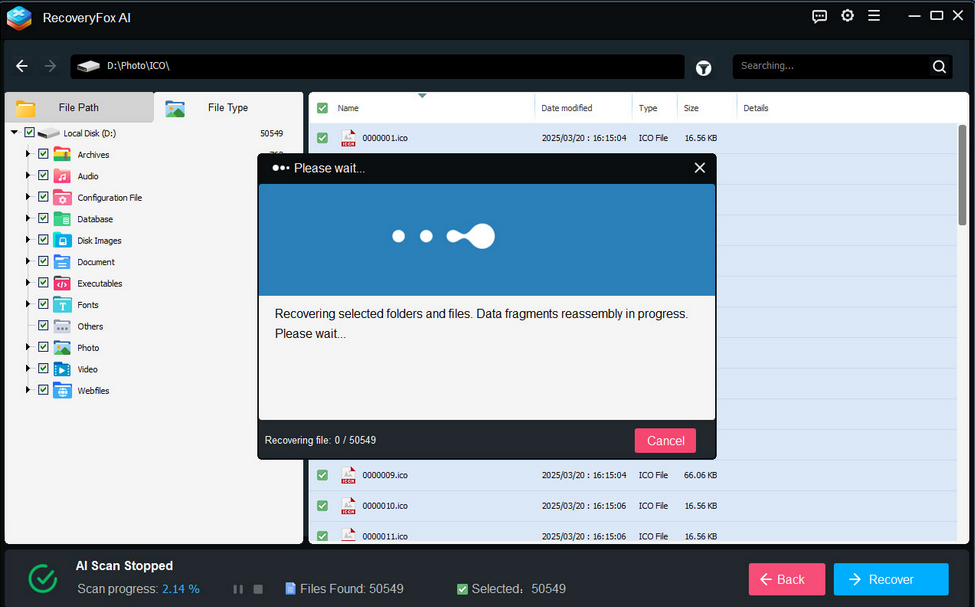
Step 5: Recover and Save.
Select the desired file and pick a safe location to save it. Finally, click on the “Recover” button.
Never save to the original drive to avoid permanent data loss.
Pros and Cons
Pros
✅ Multi-File System Support: Handles NTFS, FAT32 and exFAT seamlessly.
✅ Flexible Scanning Mode: Quick and AI scans cater to different data loss scenarios.
✅ User-Friendly Design: Newbie-friendly interface with multi-language and clear step-by-step instructions.
✅ Free Preview: Verify files before committing to recovery.
Cons
❌ No Free Recovery Tier: Unlike competitors (e.g., Stellar), almost features require a paid license.
❌ Limited macOS Support: Currently Windows-only.
Final Verdict
Is RecoveryFox AI Worth It? For most users, the answer is a resounding “yes”. Its AI-driven scanning, broad file support, and intuitive interface make it a must-have choice for recovering photos, documents, and multimedia files. While the lack of a free recovery tier may deter some, the software’s reliability justifies the cost for those facing urgent data loss.
However, if you’re dealing with physically damaged drives or need macOS compatibility, consider pairing RecoveryFox AI with professional recovery services or alternative tools. For everyone else, this tool is a worthy addition to your digital toolkit—turning potential data disasters into minor hiccups.
